Australia/Sydney
--:--:--
Posts

Dial 0900 for Claude: Giving My Old Desk Phone a Direct Line to an AI Agent

October 15, 2026
There is an old enterprise IP desk phone on my desk. It's the kind of handset that used to sit on every office desk in the country, with a coiled cord, a proper keypad and a little orange message light. It's registered to UniFi Talk on my home network, and it can only make internal calls between extensions. For most of its life with me it has been a very expensive way to call another room. A few weeks ago I had an idea that was more fun than it was sensible. I wanted to pick that phone up, dial an extension, and talk to Claude the way I'd ring a developer. "Hey, can you check something for me and call me back?" Over two days, 13 and 15 October, that idea turned into a three-container Docker stack on my Plex server. Asterisk registers to UniFi Talk as if it were a phone. Whisper transcribes what I say. Claude Code, running on my normal Claude Pro subscription rather than the paid API, does the thinking inside a locked-down container. A neural voice called Kokoro reads the answer back. Quick answers come back on the same call. Slow ones hang up and ring me back, or leave a message in UniFi Talk's voicemail if I don't pick up. I can ask follow-up questions, and it can answer questions about my own server through my own read-only API, without the AI ever holding the key. I built it with Claude, Anthropic's assistant, in the Claude app, and I want to be straight about how that worked. I treated it like a very fast contractor. The idea, the requirements, the security model and every call about what the agent should and shouldn't be allowed to touch were mine. So was the infrastructure it runs on: the phone system I'd already bent to my will, the server, and an API I'd written myself in C. Claude wrote most of the code. I ran it on real hardware, read the logs, worked out what was actually going wrong, pushed back when something didn't add up, and decided what to fix and what to leave alone. Along the way we hit a caller ID bug, a Python library clash, three phones fighting over one extension, a Linux file capability quirk that broke ping, and a speed test tool that read my connection at about 60 per cent of its real speed. This post is the whole story, including the parts that didn't work and the moment I asked whether the entire thing was pointless.
Call simulatorA replay of one call through the stack, using the timings I measured on the real server and running at double speed. The answers are examples of what it says, not live output.
What you ask
Hold limit
Answer if it rings back
Ready to dialAsking: "How full are the Plex disks at the moment?"
Hold window0 / 10 s
  1. Press dial to place the call.
The simulator above replays a real call through the stack, using the timings I measured. Pick a question, choose a hold limit, and press dial. Everything it shows is explained further down.
  • What it does: dial 0900 from my desk phone, ask anything, and get a spoken answer on the line within about ten seconds, or a callback when the job takes longer.
  • What it runs on: three Docker containers on a small Ubuntu box that also runs Plex. One handles the phone side, one runs Claude Code, and one is a tiny proxy to my homelab API.
  • What it costs: nothing extra. It uses Claude Code under my existing Pro plan, plus free local models for speech in both directions.
  • What I learnt: a lot about SIP, Asterisk dialplans, Docker networking and firewalls, and how to give an AI agent just enough access to be useful and no more.
  • Is it useful? Mostly no as a tool, and very much yes as a project. More on that later.
The phone side lives on UniFi. My gateway runs UniFi Talk, Ubiquiti's phone system, which also acts as the SIP server every handset registers to. There's no phone number and no SIP trunk to the outside world. It's internal calls only, from one extension to another, which is all I've ever needed. Talk is designed to work with Ubiquiti's own handsets. Third-party phones aren't really meant to be part of the picture, and the setup flow wouldn't let me finish without buying into the official hardware. A while back I got around that by going into Talk's database and marking the onboarding as complete myself. Once Talk believed setup was done, I could add third-party handsets through the normal interface, which is how a couple of old enterprise business phones ended up on my network. That bypass turned out to matter here. Talk has a page under Phones, Add Third-Party Device that hands you a SIP host, port, username and password for a new extension. Anything that speaks SIP can use those details to register as a phone. That includes my old desk phone, a softphone app on a laptop, and, as it turns out, a bot. The desk phone is what I call the Study Phone. It's extension 0001, assigned to me, with internal calls only, outbound intercom on, voicemail on, and no ring flow. Its call log showed a handful of short internal calls from July and August. It was not, in other words, a busy phone. The other half of this is the box that runs my media server. It's a small form factor Lenovo desktop with an Intel i5-7400 (four cores, Kaby Lake), 16 GB of RAM and an NVMe SSD, running Ubuntu 24.04 LTS. The integrated graphics handle Plex transcoding and play no part in this project. It runs Plex natively and a stack of Docker containers alongside it, and by the end of this build it was running 11 of them. It's the same machine I wrote about in Collapsing the Core and Hardening the Home Lab. When I log in over SSH, I get a custom login dashboard I wrote, a welcome.sh script that shows the state of everything at a glance. It's deliberately zero-delay. It never calls Docker, never pings anything and never makes a web request. It only reads small cache files that a background timer refreshes every 15 seconds or so, which means logging in is instant even when something is broken. It also has a set of helper commands for the services I use most. The last piece is homelab-api, a project of my own. It's a small, read-only HTTPS API written in C that reports host metrics and Docker state. It's built on libmicrohttpd and GnuTLS and only speaks TLS 1.3. It denies everything by default.
  • Access control: an IP allowlist is checked before the TLS handshake even starts. Bearer tokens are stored only as BLAKE2b hashes, never in plain text. Each token carries scopes: system:read, docker:read, docker:logs and admin.
  • Abuse handling: clients that misbehave collect strikes and escalating bans, and there's a deny-list for containers that should never be visible.
  • Hardening: it's built with hardened compiler flags, runs inside a systemd sandbox, has been fuzzed, and has an optional built-in dashboard.
It already shows up on my login dashboard as "Homelab API ● ONLINE (3ms)". That API ended up being the most interesting part of this whole project, but I'll get there. My first plan went roughly like this. I dial a local extension. That hits a webhook that calls Claude's API. My voice gets transcribed into a prompt and starts a new chat. Claude's replies show up normally on the Claude website. Then Claude rings me back, so I get a sort of voice chat mode through the phone, "like I'm calling my dev". Before building anything, I wanted to know exactly where the idea would break. The answer was a mix of "yes" and "not like that". UniFi Talk supports third-party SIP devices, so the phone side was fine. The rest had problems.
  • The phone part is very doable. A bot can register to Talk as an ordinary extension, and from Talk's point of view it's just another phone.
  • The replies can't appear on claude.ai. The API and the Claude app are separate products. There's no public API to create a chat in the Claude app or post into one, so phone conversations would need their own transcript log.
  • The API is billed separately. It's pay per token through the Anthropic Console and isn't covered by a Pro subscription.
  • A callback for every turn is clunky. Dial, speak, hang up, wait, get rung back, listen, repeat. Proper voice agents keep the call open with full-duplex audio.
The textbook version of this is a pipeline: a SIP endpoint, voice activity detection with barge-in so I could interrupt it, speech-to-text (faster-whisper locally, or a hosted service like Deepgram), the Claude API with a prompt tuned for speech, text-to-speech (Piper locally, or a hosted voice like ElevenLabs or Cartesia), audio back down RTP, and a transcript log. The watch-outs were all about latency. You want first audio in under about a second, which means streaming everything and using a small, fast model. Phone audio is 8 kHz narrowband G.711, which makes transcription harder. And the API key has to live server-side with a spending cap. Then came the honest bit, and it was hard to argue with. If all I wanted was hands-free voice with Claude, the Claude mobile app's voice mode already does that, and it syncs history. The phone build would only be worth it as a homelab project, and for one workflow the app can't do: "go and do this, and ring me when it's done". The third-party inference detour. I wasn't ready to give up on using my Pro subscription, so I went looking for a way in. In the Claude desktop app there's an enterprise screen called Configure third-party inference, with fields for a gateway base URL, a gateway API key, an auth scheme, a model list and so on. I pasted a screenshot and asked whether I could use it to run all this under Pro. The answer was no, for three reasons.
  • That screen points the desktop app at your own inference gateway (something like LiteLLM, Bedrock or Vertex) using API credentials. It moves the app off the Pro backend, not the other way round.
  • It's one-way. It doesn't let outside systems push conversations into the app.
  • Pro doesn't come with an API key at all.
The tempting workaround would be to lift the Pro session's login token and feed it to a gateway or a bot. That's against the consumer terms, it's actively blocked, and it puts the account at risk, so it was never an option. The free transcription question. I also looked at whether ElevenLabs' free transcription could run locally. It can't, because ElevenLabs can't be self-hosted. The free, local options are faster-whisper or whisper.cpp for speech-to-text, and Piper or Kokoro for speech. But transcription was never the paid part. The Claude call is. And no, driving the Claude app with browser automation to paste transcripts in wasn't an option either. It breaks the terms, it breaks every time the interface changes, and it's slow. The legitimate route. Claude Code is included in Pro, and it has a headless mode, claude -p, that takes a prompt and returns JSON. Running it on my own machine, logged in as me, for my own use, is just the command line tool working as designed. Claude flagged the caveats.
  • Each run has a few seconds of start-up latency, so it's poor for rapid back and forth.
  • It shares my normal Pro usage allowance.
  • Those conversations don't appear in my claude.ai history.
  • I should read the current terms myself, and never put other people on my Pro login.
The sensible split was to use the API (a Haiku-class model, a few cents a call with local speech) for live conversation, and Claude Code under Pro for "go and do X and ring me back". I picked the second one. A voice assistant already exists in my pocket. What doesn't is something I can hand a task to from a desk phone and forget about until it rings me back. I didn't want a voice assistant. I wanted to ring my dev. Before writing any code, I wrote down what I wanted.
  • Ubuntu, with everything in Docker, in "an isolated container". All the dependencies, Whisper included, live in the containers and not on the host.
  • The jobs will be small things. Questions, "check internet latency (ping the gateway and Google etc.)", some light research. Not coding.
  • "I don't want the agent to escape from the docker container."
  • Calls should only be accepted from the Study Phone.
  • The flow: ring the number, it says "please leave instructions then press hash once you're done", I leave a message, it runs, and it calls me back to say the job's done with a quick 15-second summary. If I don't answer, it should leave a proper voicemail using Talk's built-in voicemail.
  • Save every conversation in Claude Code on the server.
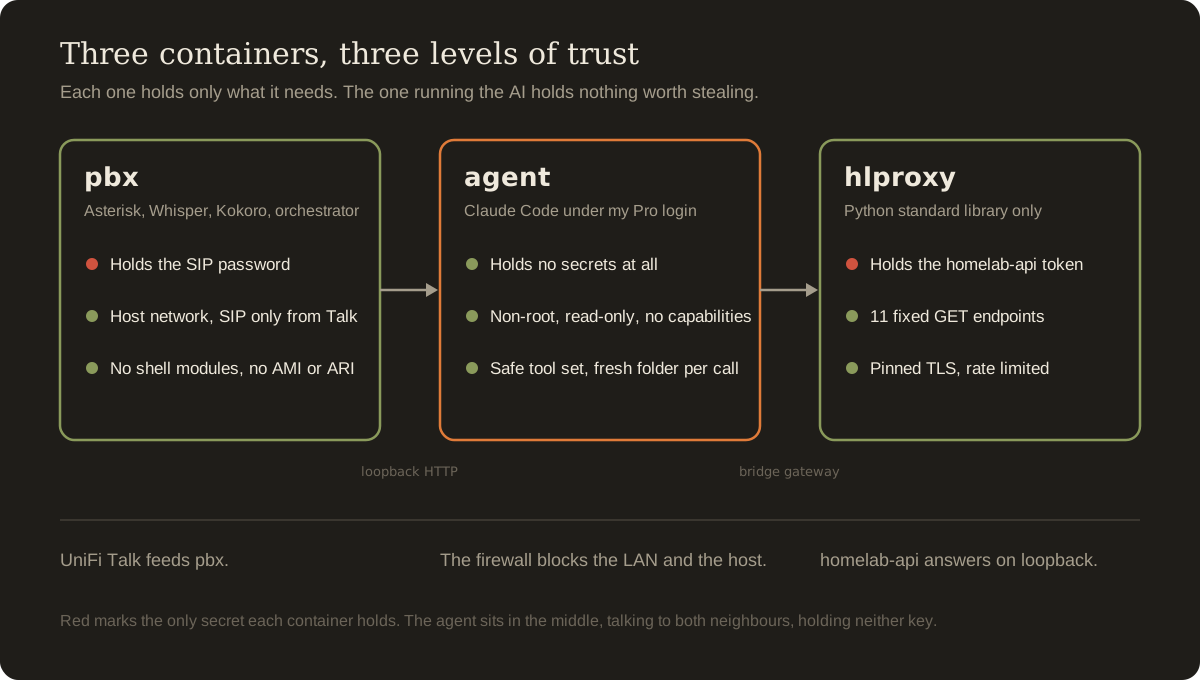
There was one catch early on. The bot needed its own third-party device and its own extension, not the Study Phone's credentials. If a second client registered as 0001, it would fight the real phone for the extension. Keep that in mind, because I ignored the spirit of that a few hours later and it bit me. The first version was two containers in one Compose stack. My one non-negotiable was that the agent couldn't escape its container, and the design that came out of that requirement made sure the part running the AI had nothing worth escaping with. That split turned out to be the most important design decision in the project. pbx handles everything to do with phones and audio.
  • Asterisk 20.6 (Ubuntu 24.04's package), faster-whisper with the small.en model in int8 on the CPU, Piper for text-to-speech with the en_GB-alan-medium voice (Piper has no Australian voice), ffmpeg, and a Python orchestrator that ties it all together.
  • Host networking, to avoid the usual SIP and RTP NAT pain when talking to Talk.
  • It holds the SIP password.
  • Every Linux capability is dropped except the few it needs to fix file ownership at start-up and then switch to the unprivileged asterisk user. no-new-privileges is on, and memory is capped at 4 GB.
agent runs Claude Code and nothing else.
  • Node and Claude Code only, running as uid 1000 with a read-only root filesystem, a tmpfs /tmp, every capability dropped, no-new-privileges, and limits on processes, memory and CPU.
  • Its own bridge network and no Docker socket.
  • Its small HTTP API is published only on the host's 127.0.0.1:8787.
  • It is deliberately not given the environment file, so it never sees the SIP password.
  • Its only persistent storage is its own home folder, which holds the Claude login and its session history.
The reason for the split is prompt injection. If Claude shared a container with Asterisk, a web page could trick the agent into reading the SIP password, and from there into driving the phone system. Keeping them apart means the part of the system that reads untrusted web content holds nothing worth stealing. Here's how a call worked in version 1.
  1. Registration. Asterisk's PJSIP stack registers to Talk as a new third-party device on extension 0900. It listens on UDP 5062 to avoid clashing with anything on the usual 5060, uses RTP ports 10000 to 10200, and speaks G.711 a-law and µ-law. An identify section means SIP is only accepted from the Talk console's address.
  2. Inbound call. The dialplan checks the caller ID matches the allowed caller (0001), answers, and plays "leave instructions, press hash". Record() stops when I press #, after 10 seconds of silence, or at five minutes, and it keeps the audio even if I hang up. The file is handed to the orchestrator over FastAGI on a loopback port, and the bot says "Got it, I'll ring you back."
  3. Processing. The orchestrator queues the job, transcribes the audio with Whisper, and posts the text to the agent. The agent runs claude -p --output-format json --max-turns 30 --append-system-prompt … --allowedTools … with my words on standard input.
  4. The summary. The phone system prompt forces the last line of every answer into a fixed format, SPOKEN_SUMMARY: followed by 35 words or fewer. Plain sentences, no Markdown, no URLs, and units written as words, so text-to-speech can read it aloud in about 15 seconds.
  5. The callback. Piper renders the summary to an 8 kHz WAV, and the orchestrator drops an Asterisk call file into the outgoing spool. Asterisk rings 0001 for 60 seconds, with two retries.
  6. Voicemail detection. When I answer the callback, it says "Your job's finished, press 1 to hear the summary." If nobody presses 1 within 6 seconds, it assumes Talk's voicemail has answered instead. It waits for 1.2 seconds of silence, which is the end of the greeting and the beep, and then plays a voicemail version: "Claude here, about your request…"
  7. Logging. Every job gets a Markdown log with the transcript, the spoken summary, the full answer, the session ID, the number of turns and the duration. The recording is kept alongside it.
Version 1 also had some hardening. Asterisk's modules that can run shell commands (app_system and func_shell) were disabled, and its management interfaces (AMI, ARI and the built-in HTTP server) were off. The orchestrator re-checked the caller ID and validated the recording path, as a second line of defence. There was an optional iptables script to keep the agent off the LAN. The agent's tools were web search, web fetch, file reading and writing, and Bash limited to ping, curl, dig, traceroute, speedtest-cli, python3 and date. That list got a lot shorter later. The README gave one piece of advice I'd pass on to anyone building something like this: prove the hardest part first. Get the test callback ringing your phone before Claude is involved at all. I wasn't home when version 1 was ready, so the first question was whether it had to be the Study Phone doing the calling. It didn't. The allowed caller and the callback extension are just two values in the environment file. The plan was to register a SIP softphone app on my MacBook to Talk over Tailscale.
  • Subnet router. Tailscale on the Ubuntu box advertises my home LAN to my tailnet, with source NAT turned off.
  • Return route. The softphone advertises its Tailscale address for audio, so the gateway needs a static route back to the Tailscale range via the server. Without it, calls connect and you hear nothing at all.
  • Codecs. G.711 only, with STUN and ICE off.
I used an app called Smart-SIP-Phone, and I also had another one called Telephone installed. And I registered it with the Study Phone's own 0001 credentials rather than creating a new device, which is exactly what I'd been told not to do. I'll come back to that. Every call I made was rejected. The Asterisk log said the same thing every time.
Text
Executing [0900@from-talk:1] NoOp("Inbound from 0900 to 0900")
Executing [reject@from-talk:1] NoOp("Rejected caller 0900 - not 0001")
Hangup(21)
Talk then sent the call on to 0900's voicemail, so from my end it looked like the bot was sending me straight to voicemail. The cause was in the version 1 config. It set callerid="Claude" <0900> on the PJSIP endpoint, meaning it as the caller ID the bot would show when it rang me back. But on a PJSIP endpoint, that setting also overwrites the caller ID of incoming calls. Every caller looked like the bot itself, and the bot was only allowed to talk to 0001. The fix was to remove it, since the callback's caller ID is set in the call file anyway. The second attempt still showed 0900. There were two possible reasons. Either the container hadn't actually been rebuilt with the fix, or Talk carries the real caller number in a different SIP header, P-Asserted-Identity or Remote-Party-ID. We added trust_id_inbound=yes, which is safe here because only the Talk console's address can match the endpoint, and logged the raw From, PAI and RPID headers so we could see what Talk was really sending. After a proper docker compose up -d --build pbx, the log finally said Inbound from 0001 to 0900. It answered and recorded. I genuinely don't know which of the two changes fixed it, because the first one may never have been deployed. I'd rather admit that than pretend otherwise. The log was full of red, and none of it mattered. At every start-up, Asterisk printed a wall of errors. ARI modules failing with undefined symbol: ast_ari_response_alloc_failed, LDAP, PostgreSQL, ODBC and IMAP voicemail backends, parse errors in geolocation.conf, and a missing music-on-hold directory. All harmless. Ubuntu's Asterisk package loads every module it can find, and we'd switched ARI off on purpose, so its sub-modules complained about the missing parent. Later on, a long noload list in modules.conf quietened it all down. The first call that made it through was 13.4 seconds of audio, and it died the moment Whisper touched it.
Text
File ".../faster_whisper/audio.py", line 46, in decode_audio
    with av.open(input_file, mode="r", metadata_errors="ignore") as container:
TypeError: open() got an unexpected keyword argument 'metadata_errors'
pip had installed faster-whisper and PyAV, the library it uses to decode audio, at versions that didn't agree with each other. Not pinning them was a mistake. The fix was better than pinning, though. It decoded the audio with ffmpeg directly to 16 kHz mono 32-bit float samples and handed those straight to Whisper, so PyAV is never used at all. It also changed the owner of the Whisper model cache to the runtime user, which fixed a "Permission denied" warning about the cache. The next round of calls crashed in exactly the same way, with the traceback still pointing at the old line number. The container hadn't been rebuilt. The old code was still running. That's a lesson I've now learnt twice in one project. When a fix doesn't work, check that the fix is actually what's running before you start debugging it. The same logs showed another problem, and this one was mine. The error callback was ringing my phone while I was dialling 0900 again over the top of it. The callbacks went to voicemail because I was already on a call. Still, the error callback itself worked exactly as designed. The bot rang back and told me something had gone wrong. Once the container was rebuilt properly, the whole loop worked end to end. These were the first real jobs, on the evening of 13 October.
TimeRequest, as transcribedClaude CodeCallback
19:14"Test 1, write me a 10-word story about the sun."Done in 7 sRang, answered after 5 s
19:15"Tell me one story about cheese."Done in 10 sRang 31 s, then voicemail
Transcription took about two seconds per message on the i5. But look at the callback column. A call made from the desk phone itself that evening never got its callback either, and it took me a moment to work out why. The cause was the shortcut I'd taken while testing. Three different clients were registered with the same 0001 credentials: Smart-SIP-Phone on my Mac, the Telephone app on my Mac, and the real desk phone. SIP registration is last writer wins. Talk delivers incoming calls to whichever client registered most recently, but any of them can still dial out. So the desk phone could call 0900 without any trouble. But when the bot rang 0001 back, the call went to my Mac, where nobody answered, and after about 30 seconds Talk's voicemail picked up and took the message. Closing the Mac apps handed 0001 back to the desk phone. I deleted both of them. The proper fix, giving the Mac its own extension, was on offer, and I didn't take it at the time.
Who gets the callback?Three clients signed in with the same 0001 credentials. Any of them can dial out, but incoming calls only go to the last one that registered.
Desk phonethe Study Phone itselfregistered 1 of 3
Smart-SIP-Phonesoftphone on my Macregistered 2 of 3
Telephoneanother app on my Macgets incoming calls
Register the clients in any order, then let the bot ring 0001.
It also exposed something I hadn't really thought about. Access control was by extension, not by person. Anyone standing at the Study Phone could run jobs on my Pro account. A PIN was the obvious fix, and I decided against it. It's a straight trade between convenience and control, and I'll come back to it at the end. I wanted my SSH login dashboard to show the phone system and its commands. Because the dashboard is zero-delay by design, everything new had to follow the rules I'd set for it: read files that already exist, in pure bash, without starting any subprocesses.
  • A status line: "Claude Phone ● ONLINE", "PARTIAL" or "OFFLINE", worked out from the cached list of running containers. PARTIAL names whichever half is down.
  • An activity line: "Claude Phone: N job(s) today · last 7:18 pm "first few words of the request"", built with bash globs over the job logs and a read loop that finds the first quoted line.
  • An access entry: "dial 0900", read from the environment file by picking out the single line holding the bot's SIP username. It never sources the file, because that file also holds the SIP password. A test run confirmed the password never printed.
  • Shell commands: a small aliases file of phone-* functions, covering on, off, restart, rebuild, env, status, sip, logs, activity, jobs, last, job, today, test, ask, login, resume, prompt and help.
phone-ask "…" turned out to be one of the most useful parts of the whole project. It sends text straight to the agent and prints the answer, with no phone involved. It's the same locked-down agent, and the same job log, from any terminal. At this point I stepped back and asked the uncomfortable question out loud: was the whole thing pointless? The honest answer has stuck with me: mostly yes as a tool, no as a project. The case for pointless was strong.
  • The Claude app's voice mode already does voice, better, from anywhere.
  • A 15-second summary is far too thin for any real research.
  • The callback is fragile. It depends on registration, on voicemail timing, on nobody else holding the extension.
  • It costs Pro allowance and adds a system to maintain.
  • My actual usage so far had been test jokes and a story about cheese.
The case against was just as real. It taught me SIP and PJSIP, Asterisk dialplans, call files, a speech pipeline, Docker hardening, and how to sandbox an AI agent with least privilege. It's a good thing to write up. There's one narrow use that's genuinely useful. And phone-ask over SSH is handy in its own right. The advice was to decide what it's for, and then stop. I chose to keep going, and asked how I could improve it "a bit more". We laid out the options.
  1. Homelab-aware answers through my own API, which is the one thing the phone app genuinely can't do
  2. Staying on the line for quick answers
  3. Pushing the full result to my iPhone with ntfy
  4. Follow-up questions
  5. Security work: a PIN, a permanent LAN lockdown, a trimmed tool list, a fresh workspace per job
  6. The Mac on its own extension, with callbacks going to whoever called
  7. A morning briefing call
  8. A better voice, using Kokoro
I didn't want all of it, so I picked a handful. Homelab access, the one thing the Claude app on my phone genuinely can't do. Staying on the line, which fixed the clunkiest part of version 1, with a 10-second rule: if a job takes longer than that, hang up and call back. Follow-ups, so a conversation could carry on past one question. For the homelab side I pasted in my own homelab-api README, which meant the design used exactly what my API already offered and needed no new endpoints. I also picked Kokoro instead of Piper, and an agent locked down so it can't escape, with read-only access to the homelab. I said no to the PIN, ntfy, the morning briefing and per-caller callbacks, at least for now. Version 2 rewrote the dialplan around a shared loop called converse. Both inbound calls and answered callbacks use it.
  1. Play a prompt and record until # is pressed, the caller pauses, or the maximum length is reached.
  2. Submit the recording over FastAGI. The orchestrator checks it while the caller waits: the file must exist, be at least 1.5 seconds long, and have enough audio energy to not be silence. If it passes, the orchestrator sets JOBID on the channel. If not, it leaves it blank and the call ends politely.
  3. Play "Got it. One sec."
  4. Loop for up to HOLD_SECONDS. Each time round, check whether a .ready file for the job has appeared. If not, play the hold tone, which is two soft 660 Hz blips about a second and a half long, generated with numpy.
  5. If it's ready: tell the orchestrator it was delivered, play the answer, then say "Anything else? Ask after the tone, or just hang up." Four seconds of silence counts as a no, and the bot says "No worries. Bye."
  6. If it's not ready in time: tell the orchestrator to detach the job, say "This one's taking a bit longer. I'll ring you back when it's done", and hang up.
  7. If I hang up early: anything I said before submitting is still submitted, in callback mode. If I hang up while holding, the job is detached and I get a callback.
This is the heart of it, straight from the dialplan template.
Ini
[converse]
exten => s,1,Set(JOBFILE=${SPOOL}/inbox/${EPOCH}-${RAND(1000,9999)}.wav)
 same => n,Playback(${PROMPTS}/${PROMPT})
 same => n,Record(${JOBFILE},${SIL},{{RECORD_MAX_SECONDS}},k)
 same => n,AGI(${AGI}/submit,${JOBFILE},${CALLER},hold,${PARENT})
 same => n,GotoIf($["${JOBID}" = ""]?bye)
 same => n,Playback(${PROMPTS}/working)
 same => n,Set(DEADLINE=$[${EPOCH} + {{HOLD_SECONDS}}])
 same => n(wait),GotoIf(${STAT(e,${SPOOL}/outbox/${JOBID}.ready)}?ready)
 same => n,GotoIf($[${EPOCH} >= ${DEADLINE}]?later)
 same => n,Playback(${PROMPTS}/hold)
 same => n,Goto(wait)
 same => n(ready),AGI(${AGI}/delivered,${JOBID})
 same => n,Playback(${SPOOL}/outbox/${JOBID})
 same => n,Set(PARENT=${JOBID})
 same => n,Goto(s,1)
 same => n(later),AGI(${AGI}/detach,${JOBID})
 same => n,Playback(${PROMPTS}/later)
 same => n,Hangup()
The orchestrator keeps per-job state, done, delivered, detached and callback_placed, behind a lock. A callback is placed exactly once, and only if the job is done and the caller has left and they didn't already hear the answer. That handles the nasty race where a job finishes a fraction of a second after the hold times out. Without the lock you could hear the answer on the line and then get rung back with it as well. The callback path reuses converse once I press 1, so follow-ups work there too. Every conversation is a thread, named after the first job's ID, and follow-ups inherit it. Claude Code stores its sessions per working directory, so each thread gets its own empty folder, and a follow-up runs claude -p --resume <session-id> inside that same folder. If a session has gone missing, which shows up as "No conversation found", it retries as a fresh conversation. If the parent job failed before Claude even ran, the follow-up prompt is put together by hand from the earlier question and answer. Job metadata is saved as JSON next to the logs, so follow-ups survive restarts. Piper was replaced with kokoro-onnx 0.5.0 running on ONNX Runtime on the CPU. The int8 model (about 90 MB) and the voices file (about 28 MB) are baked into the image, and the full precision model (about 325 MB) is an option. The voice is bm_george in British English. The British voices on offer are bf_alice, bf_emma, bf_isabella, bf_lily, bm_daniel, bm_fable, bm_george and bm_lewis. There's no Australian voice, so my phone now speaks with a British accent. In a test environment, the int8 model took 3.43 seconds to synthesise a 7.4 second sentence. The output is peak-normalised and resampled to 8 kHz for Asterisk. Testing turned up one easy win. The orchestrator now generates the on-line version of the answer before the voicemail version, so a caller who's holding hears the answer about two seconds sooner. This was the feature I cared about most, and it's the one that taught me the most. homelab-api is my own project, written in C, and I already knew exactly what it exposed and how its scopes worked. I wanted to be able to ask "how full are the Plex disks?" and get a real answer from my own homelab-api. But I didn't want the agent, the part of the system that reads arbitrary web pages, to ever hold an API token. The answer was a third container called hlproxy. It's written in Python using only the standard library, runs as nobody with a read-only filesystem and every capability dropped, and is capped at 128 MB of RAM.
  • It holds the token. The agent never sees it.
  • It exposes exactly 11 fixed GET endpoints: /health, /system, /cpu, /memory, /disks, /temps, /network, /docker, /containers, /container/<name> and /stats/<name>. Each maps to one of homelab-api's /v1/... paths. Container names are checked against a strict pattern before they're used.
  • Nothing else gets through. No query strings, no request bodies. Any method other than GET gets a 405. Path length is capped, upstream responses are capped at 512 KB, and there are at most two requests in flight and 20 requests per 10 seconds.
  • It checks who's asking. It only answers clients from the agent's own Docker network.
  • It pins TLS. It connects to homelab-api over loopback and verifies the certificate against the API's own certificate file, under the name the certificate was issued for.
Here's the allowlist itself. If it isn't in this table, the agent can't ask for it.
Python
ROUTES = {
    "health": "/v1/health",
    "system": "/v1/system",
    "cpu": "/v1/system/cpu",
    "memory": "/v1/system/memory",
    "disks": "/v1/system/disks",
    "temps": "/v1/system/temps",
    "network": "/v1/system/network",
    "docker": "/v1/docker/info",
    "containers": "/v1/docker/containers",
}
NAMED = {
    "container": "/v1/docker/containers/{name}",
    "stats": "/v1/docker/containers/{name}/stats",
}
NAME_RE = re.compile(r"^[A-Za-z0-9][A-Za-z0-9_.-]{0,63}$")
Connecting over loopback was a deliberate choice. homelab-api has an allow_loopback setting that admits local clients without touching the allowlist, and loopback clients are never banned. That matters more than it sounds. homelab-api counts a request for a container that doesn't exist (a 404) as a strike against the client. An AI that guesses a container name wrong a few times could otherwise get the proxy banned. Over loopback, it can't. hlproxy uses host networking but binds only to the agent bridge's gateway address. That network doesn't exist until Docker creates it, so the proxy retries its bind until it does. The token itself is created with system:read and docker:read only. Read-only was my call, and the scopes to express it were ones I'd designed into the API in the first place. No docker:logs, because container logs very often contain secrets, and definitely no admin. On the agent side, there's a homelab command: homelab overview, cpu, memory, disks, temps, network, system, health, docker, containers, container <name> and stats <name>. The system prompt tells Claude to use it for anything about "the server", "the Plex box" or "the homelab", and that it's strictly read-only. If I ask it to restart something, it's told to say it can't and suggest the command I'd run myself.
Three boxes for the pbx, agent and hlproxy containers. pbx holds the SIP password, hlproxy holds the homelab-api token, and the agent in the middle holds no secrets at all.
"I don't want the agent to escape" was the requirement I cared about most. Version 2 tightened everything. Tools. There's now a hard-coded safe set: WebSearch, WebFetch, and Bash limited to ping, dig, traceroute, speedtest, date and homelab. A setting in the environment file can only narrow that list. Anything else it asks for is ignored and logged. On top of that, the wrapper explicitly passes --disallowedTools for Write, Edit, MultiEdit, NotebookEdit, Read, Glob, Grep, python, curl, wget, sh and bash. The agent has no file tools at all. It doesn't need them, because its answers come back through the job log. The container. /tmp is a 256 MB tmpfs mounted noexec,nosuid,nodev, so nothing written there can be run. It's limited to 256 processes, 3 GB of memory and 2 CPUs. It uses public DNS (1.1.1.1 and 1.0.0.1), so it never talks to my LAN's DNS server. curl, wget and jq are gone from the image. The old option to skip Claude Code's permission prompts was removed entirely. A fresh folder per conversation. Claude Code reads a CLAUDE.md file from its working directory if one exists. If every job ran in the same folder, a malicious web page could get the agent to plant one there and quietly steer every future job. Giving each conversation its own empty folder closes that off. The host firewall. This is where a hole in the version 1 script turned up, and it's my favourite bug in the project. Docker gives you a chain called DOCKER-USER for your own rules about container traffic, and that's where version 1 put its LAN lockdown. But DOCKER-USER only sees forwarded traffic, packets that pass through the host on their way somewhere else. A packet from a container addressed to the host itself never gets forwarded. It goes through the INPUT chain instead, and the rules in DOCKER-USER never get a say. So with version 1's rules in place, the agent couldn't reach other machines on my LAN, but it could reach every service running on the Plex box itself. That included Plex, the Cockpit admin console, homelab-api directly, a web service with no login at all, and everything else listening on the host. Try it in the map below.
Firewall mapSend a packet from the agent container to each destination and see which chain decides its fate. Switch between the v1 rules, which lived only in DOCKER-USER, and the v2 rules, which also guard INPUT.

agent
  • Internet
  • LAN
  • This host
Nothing sent yet.
Version 2 installs a firewall as a systemd unit, claude-phone-firewall, which re-applies itself at boot and whenever Docker restarts.
  • CPHONE-FWD, jumped to from DOCKER-USER. It allows established connections, the agent's own subnet, ping and DNS to the gateway, and nothing else private. Every private range is dropped, including Tailscale's. The internet is allowed, because Claude needs it.
  • CPHONE-IN, on INPUT for the agent's bridge interface. It allows established connections and hlproxy's one port, and drops everything else.
Bash
ipt -N CPHONE-IN
ipt -A CPHONE-IN -m conntrack --ctstate ESTABLISHED,RELATED -j ACCEPT
ipt -A CPHONE-IN -d "$HLPROXY_IP" -p tcp --dport "$HLPROXY_PORT" -j ACCEPT
ipt -A CPHONE-IN -j DROP
ipt -I INPUT 1 -i "$BRIDGE" -j CPHONE-IN
To make that possible, the agent's bridge has a fixed interface name, br-cphone, so the rules can target it. The script is idempotent, so running it twice doesn't duplicate anything, and it cleans up the rules left behind by the old script. Optional gVisor. For the strongest version, an install script plus one setting runs the agent on gVisor's user-space kernel. Even a Linux kernel exploit inside the container would then hit gVisor rather than my real kernel. It's off by default, for two honest reasons: installing it restarts Docker, which restarts every container on the box, and it hasn't been tested here. The prompt. The system prompt also changed. It now says to be quick because the caller may be holding, that a request may be a follow-up, to ping with ten packets and report the average, maximum, jitter and loss, to only run a speed test when asked, how to use the homelab command, and that it can't change anything, so it should suggest the command instead. Before version 2 went anywhere near my server, it was tested in a sandbox, and this was one of the cleverer parts of the project. It installed the same Asterisk 20.6 package, rendered the real config templates, and drove simulated phone calls using Asterisk Local channels. One leg of the call ran the bot's dialplan as if it came from 0001. The other leg was "me". It played a Kokoro-generated voice saying "Hey Claude, how full are the Plex disks at the moment?" and then stayed on the line. The real orchestrator ran with the real Kokoro voice, but Whisper and Claude were replaced by a test harness with a configurable "thinking" delay. Testing turned up a lovely gotcha. A Local channel sitting in Wait() sends no audio frames at all, so Record()'s silence detection never fires and the call hangs forever. Real phones send a continuous stream of RTP even when you're not talking. The fix was to make the fake caller play a file of silence instead of waiting. A simulator is only useful if it behaves like the real thing in the ways that matter.
ScenarioResult
Quick job, fake Claude takes 2 sHold blips, answer read on the line, "Anything else?", silence, goodbye. No callback.
Slow job, 18 sAfter 10 s, "I'll ring you back" and a hang-up. The job finished at 22 s and a callback was queued. It couldn't connect because the sandbox has no Talk, which was expected.
Callback, press 1, follow-upThe fake caller pressed 1, heard the answer, then asked "And which one is the fullest?" The follow-up resumed the same session in the same thread folder, and the log showed the link to the parent job.
The first follow-up attempt failed only because the test caller started talking after the four-second window had closed, so the timing was adjusted. The answer on the line arrived about two seconds before the job had fully finished, thanks to generating the on-line audio first. hlproxy was tested against a fake homelab-api speaking real TLS.
  • Memory and the container list worked, and a missing container gave a friendly 404.
  • The homelab tool refused ../admin outright.
  • Raw attempts at v1/admin/bans, logs/plex, container/plex/logs and memory?x=1 got 404, 404, 404 and 400. A POST got 405. The fake API only ever received the three allowed paths.
  • A wrong certificate name gave "TLS verification failed", a wrong token gave "refused the proxy's token", and a client outside the agent subnet got "forbidden".
The agent wrapper was tested with a fake claude binary. Asking for Write and Bash(python3:*) through the environment file was ignored and logged. The working directory was the thread's own folder. --resume was passed on follow-ups. A dead session retried fresh. And a thread ID of ../../etc was rejected. The firewall was applied twice to check it didn't duplicate rules, inspected, and removed cleanly. Deployment on 15 October took about 45 minutes around lunchtime. I copied the zip over from my Mac with scp, backed up the old folder, unzipped over the top, created a homelab-api token, ran ./setup.sh, did a docker compose down and up -d (needed once, because the network had been renamed), and installed the new dashboard block and aliases with a one-liner. The token was the part that went sideways.
  1. The one-liner I used captured the token into a shell variable, and .env ended up with an empty value. Most likely I'd run it more than once. The token name already existed, so the create command failed, and the capture got nothing. homelab-api only shows a token once, so it was gone.
  2. The first revoke command had the wrong syntax. The CLI wants token revoke --name claude-phone, not token revoke claude-phone.
  3. The environment file still held an example token from the template, so hlproxy reported "homelab-api refused the proxy's token".
  4. A direct curl test against homelab-api, forcing the certificate's name to resolve to loopback, separated "bad token" from "proxy problem".
  5. A fresh token, systemctl reload homelab-api, paste it in, recreate hlproxy.
  6. The first health check said "Connection refused", but only because hlproxy had restarted zero seconds earlier.
  7. Then: {"status":"ok","token":"claude-phone","scopes":["system:read","docker:read"],"client_ip":"127.0.0.1"}.
After deployment, phone-status showed all three containers up and SIP registered. The agent's tool list was exactly the safe set: WebSearch, WebFetch, and Bash for ping, dig, traceroute, the speed test, date and homelab. My login dashboard showed Claude Phone ● ONLINE next to API Proxy ● ONLINE and Homelab API ● ONLINE (3ms), with 11 containers running. The busiest process during start-up was Python at 116 per cent, which was Kokoro generating the voice prompts. There was one nice moment before the token was fixed. I ran phone-ask "how full are the plex disks?", and instead of making numbers up, it explained clearly that the API had rejected its token and it couldn't check. That's exactly the failure mode you want from an agent. With the token in place, the same question came back with real data.
DriveSizeUsedFreeFull
Plex media drive one4.0 TB3.23 TB766 GB80.9%
Plex media drive two4.0 TB2.77 TB1.23 TB69.2%
It also noticed the system drive was only 8 per cent used, and suggested saving new media to the second drive. The spoken summary was: "Plex one is 81 percent full with about 770 gigabytes free. Plex two is 69 percent full with about 1.2 terabytes free. That's 2 terabytes free across both drives." Then I tried to break it with a deliberately chaotic message, typos and all: "what is 12^34. explain the movie pulp fiction in 400 words pls. ping google. ping 1.1.1.1. tell em the time rn. what does a goo dprice of a nvme 2tb ssd look like in aus"
  • 12³⁴: it answered 4,922,235,242,952,026,704,037,113,243,122,008,064. It had no calculator, because Python was taken away, so it worked it out by hand by squaring its way up to 12¹⁷ and squaring that, then cross-checked the size with logarithms. It's exactly right, all 37 digits. You can check its working below.
  • Pulp Fiction: a solid summary of about 400 words.
  • The pings: "Operation not permitted". That's a bug, and it's the next section.
  • The time: "1:10 pm AEDT, Thursday 15 October 2026".
  • 2 TB NVMe prices in Australia: a table of price bands. Around 160 to 200 dollars is a bargain, 220 to 260 is fair for a Gen4 drive, 270 to 330 is brand-name pricing, and 380 or more is either Gen5 or overpriced. It cited StaticICE, Scorptec, OzBargain, Camelcamelcamel and Amazon AU. That was the agent's own web research, and nobody independently checked it.
  • The spoken summary: "It's 1:10 pm. Twelve to the thirty-fourth is about 4.92 times ten to the thirty-six. Pings were blocked, so no results. A good 2 terabyte drive costs about 220 dollars, under 200 is a bargain."
Check its workingThe agent had no calculator, so it squared its way to the answer by hand. This redoes the same steps in your browser with exact integer maths.
What the agent said over the phone4,922,235,242,952,026,704,037,113,243,122,008,064
  1. Press check to run the squaring chain.
The ping failure was a good one, because the hardening caused it. Debian's iputils-ping package gives /usr/bin/ping the cap_net_raw file capability when it's installed, using setcap cap_net_raw+ep. It's a way to let ordinary users send raw ICMP packets without making ping setuid root. But the agent container drops every capability. When a binary carries a file capability that can't be granted, the kernel refuses to run it at all. It reproduced cleanly in a sandbox using setpriv to drop every capability and run as uid 1000. The stock binary failed with failed to execute /usr/bin/ping: Operation not permitted. A copy with the capability stripped (setcap -r) pinged perfectly, using unprivileged ICMP sockets, which the container already allows through the net.ipv4.ping_group_range setting. So the fix was one line in the agent's Dockerfile, setcap -r /usr/bin/ping, with the lockdown untouched. Then the fix broke it in a different way. To keep the image lean, the Dockerfile also purged libcap2-bin, the package that provides setcap, once it had been used. On Debian, iputils-ping depends on libcap2-bin, so apt quietly removed ping along with it. After deploying, docker compose exec agent ping said executable file not found in $PATH. apt-cache depends iputils-ping and a simulated purge confirmed it, and version 2.1.1 purges only curl. It's a neat example of a clean-up step undoing the very fix it was cleaning up after. I asked it to run a speed test, and it came back with a download figure of roughly 60 per cent of my plan's speed and a ping of 1,800,000 milliseconds. The agent called the ping figure nonsense straight away, since a 30-minute ping couldn't carry that much download. The download figure was the one that bothered me. I knew it was wrong, because my line delivers its full speed on every device in the house. The cause turned out to be the tool, not the network. The Python speedtest-cli is single-threaded, and it's well known for under-reading fast connections. Reading a bit over half the real speed is typical of it, and the upload result was spot on. The 1,800,000 ms "ping" is the value it reports when its latency test fails. The firewall doesn't limit throughput at all.
One connection versus manyThe pipe is my internet plan. Each moving line is one download connection. Run both tools and compare how much of the plan they manage to fill.
Download, as a share of my plan–
1 connection · ping reported as 1,800,000 ms (its failure value)
The fix was to swap it for Ookla's official speedtest command line tool, a static binary that uses multiple connections, run with --accept-license --accept-gdpr. The agent's prompt now knows my plan's speeds, so it can compare against them. One caveat: the build sandbox couldn't reach Ookla's download server to verify the URL during the build. If that step ever fails, the fallback is Ookla's apt repository. The whole thing lives in a private GitHub repository, packaged with a README, a changelog running from version 1.0 to 2.1.1, and a tests folder holding the dialplan simulation harness, its test contexts, the fake homelab-api and a test guide. There's a CI workflow that checks the Python and shell syntax, runs shellcheck, validates docker compose config, and makes sure the Asterisk templates render with no leftover placeholders. The shell commands and a reusable login dashboard block are in there too. homelab-api needed no code changes at all. The integration only uses its existing read-only endpoints and loopback access. There's an optional document for its repository describing Claude Phone as an example of a least-privilege client. Here's every bug in one place, with the real cause and what I took from each.
SymptomReal causeFixLesson
Every call "Rejected caller 0900", then voicemailcallerid= on a PJSIP endpoint also rewrites inbound caller IDRemoved it, caller ID set in the call file, trust_id_inboundRead what a setting does in both directions
TypeError about metadata_errorsfaster-whisper and PyAV versions disagreedDecode with ffmpeg and pass samples to WhisperPin dependencies, or remove the fragile layer
Same crash after the fixThe container wasn't rebuilt--build, and check the running container for the fixVerify the code that's actually running
"Not calling back"Three clients registered as 0001, and calls go to the last oneOne device per extensionSIP registration is last writer wins
Callbacks missedDialling out again while the callback rangCall once and waitPatience
Agent could reach every host serviceDOCKER-USER only sees forwarded traffic, and container to host is INPUTA separate INPUT chain on a named bridgeTest the host itself, not just the LAN
Simulated calls hungWait() sends no frames, so Record never hears silencePlay a silence file insteadSimulators must behave like real endpoints
Homelab token blankThe capture got nothing when the create failed on a duplicate nameCreate by hand, with 2>/dev/nullDon't capture once-only secrets blindly
"refused the proxy's token"An example token left in the environment fileReal token and a reloadTest the credential directly first
ping "Operation not permitted"ping's cap_net_raw file capability can't be granted with every capability droppedsetcap -r, with unprivileged ICMP socketsHardening has side effects, so reproduce them
Then ping "not found"Purging libcap2-bin also removed iputils-ping, which depends on itOnly purge curlCheck reverse dependencies before purging
Speed test far below the real line speedA single-threaded Python toolOokla's official CLIMeasure with the right instrument
By my count, Claude got at least six things wrong along the way: the PJSIP caller ID line, the unpinned Whisper dependencies, the ping capability, the choice of speed test tool, the token one-liner and the revoke syntax. I got a few wrong too: registering three clients to one extension, and not rebuilding containers. None of it was hidden from me, and every one of those mistakes was found by reading the logs rather than guessing, which is the part of working with an AI on infrastructure I'd most want to pass on.
ThingNumber
Whisper transcription (small.en on the i5-7400)About 2 s per message
Claude Code, per simple job6 to 10 s, up to about 15 s
Kokoro int8 synthesis (sandbox benchmark)3.43 s for 7.4 s of speech
End to end for a quick questionAbout 10 to 15 s, so many land just over the hold limit
Talk ringing before voicemail picks upAbout 30 s
Window to press 1 on a callback6 s
Agent limits2 CPUs, 3 GB RAM, 256 processes, 256 MB noexec /tmp
hlproxy11 endpoints, 20 requests per 10 s, 512 KB response cap, 128 MB RAM
homelab-api health check from the dashboard3 ms
Containers on the box after install11
  • The Claude app's voice mode does voice better. This is a homelab and learning project with one genuinely useful niche: hands-free "check the server, check the internet, look this up and ring me back" from a desk phone, plus phone-ask over SSH.
  • The 10-second hold is tight on this CPU. Many simple questions turn into callbacks. Raising HOLD_SECONDS to 20, or pointing the agent at a Haiku model, helps a lot. Try both in the simulator at the top.
  • It uses my Pro allowance. Jobs come out of my normal Claude Pro usage. If I hit the limit mid-job, the callback tells me it failed. It's strictly personal, and nobody else goes on my Pro login.
  • Access is per extension, not per person. I chose not to add a PIN, so anyone at the Study Phone can use it.
  • Prompt injection is still possible during web research. A malicious page could trick the agent into sending what it can see (homelab metrics, container names, my question) to a website through web fetch. What limits the damage is everything else in this post. It holds no secrets, can't write files, can't reach the LAN or the host's services, and only has read-only homelab access. Anything sensitive can be hidden with homelab-api's container deny-list.
  • Phone conversations don't appear in my claude.ai history. They live in the job logs and Claude Code sessions on the server.
  • gVisor is optional and untested here, and Ookla's download URL couldn't be verified from the build sandbox.
  • There's no Australian text-to-speech voice, so it answers me in a British accent.
  • Confirm the Ookla build works, and run a real speed test from the agent.
  • Make a real voice call on the desk phone with version 2.1.1, now that ping and the speed test are fixed.
  • Maybe: raise the hold to 20 seconds, try gVisor, give the Mac its own extension with per-caller callbacks, push full results to my phone with ntfy, or set up a morning briefing call.
  • Write up the "clients" document for homelab-api's repository.
As a tool, mostly not. My phone already has a better voice assistant in the Claude app, and most of what I'd ask this one I could just type. As a project, absolutely. I now understand SIP registration well enough to explain why three phones fought over one extension. I've written dialplans, call files and FastAGI handlers. I've built a speech pipeline that runs entirely on a nine-year-old CPU. Most usefully, I've built a working example of how to give an AI agent real abilities without trusting it. It has no secrets of its own, its only route to anything sensitive goes through a proxy with eleven fixed doors, and there's a firewall that covers the path I didn't know existed. That pattern, least privilege with the credential held one step away from the thing that reads untrusted input, is the one I'd use for any agent from here on. And when it works, it's genuinely delightful. I pick up a phone that was designed to call the room down the corridor, ask how full my disks are, hear a couple of soft blips, and a calm British voice tells me. There are more sensible ways to talk to an AI. But half the point was making the desk phone ring.
On this page